Caching Is Quietly Corrupting Our QA Signal

Branch vs staging QA testing environment comparison showing clean isolated branch deployment versus staging environment with accumulated cache and session state causing test inconsistencies

Branch testing passes cleanly. Same code hits staging and behavior shifts between testers. No redeployment. No code changes. Just invisible client state corrupting validation. Here’s how unmanaged caching breaks QA determinism and what to check instead of arguing about it.

Abstraction Is Not the Enemy, Losing Track of It Is

Illustration showing abstraction layers in software systems where hidden gaps represent untested assumptions.

Abstraction keeps software teams moving until it hides just enough detail to make correctness impossible to verify. This post breaks down where abstraction helps, where it quietly moves risk, and why QA exists to surface what compression leaves behind.

Why QA Fails Without Fragmentation (and How Fragmentation Protects Systems)

Monolithic system with tangled dependencies versus fragmented system with isolated modules and contained failures, illustrating why QA works better with fragmentation

QA doesn’t exist to check quality. It exists to contain blast radius. That only works when systems are fragmented on purpose. Learn why fragmentation makes debugging possible, why test cases need isolation to survive, and why production testing fails without it.

Production-Ready QA Prompts: The Copy-Paste Library

QA authority enforcing strict validation boundaries against AI overreach

A copy-paste library of production-ready QA prompts for real testing work. Screenshots, videos, test cases, acceptance criteria, and production bugs no theory, just usable prompts.

Testing in Production (Because Reality Doesn’t Care About Your Test Plan)

Warning symbol with circuit board background and "Don't Test in Production" text in bold letters

CI passed. Staging was green. Users still broke it. Most teams already test in production, they just call it “rolling out behind a flag” or “watching the logs closely.” This isn’t about justifying recklessness. It’s about naming what actually happens when systems outgrow certainty.

Why Cypress is More Than UI Automation (And How Most Teams Get It Wrong)

Testing pyramid showing API tests as foundation with integration tests middle layer and UI tests at top for optimal automation strategy

Most QA teams treat Cypress as just another UI automation tool. They’re missing out on API testing, network stubbing, database validation, and debugging features that make automation actually maintainable. This guide shows you how to use Cypress as a full-stack testing framework and testing APIs directly, stubbing network responses, validating database state, and catching integration bugs that separate tools would miss. Includes working examples using the QA Journey Playground.

Why Error 429 and Error 500 Are a QA’s Best Friends: The Daily Reality of Testing Critical Flows

Split screen illustration of developer calmly saying "works on my machine" versus QA analyst surrounded by 429 and 500 error messages in flames during checkout testing

429 and 500 errors are a QA’s constant companions, especially during checkout testing. Here’s why these errors show up repeatedly in payment flows, how to professionally handle “works on my machine” pushback from devs, and why catching these errors before production is exactly what QA is supposed to do.

Website Annotation Tools for UAT Testing & QA : Why I Use Free, Built-in Tools Across Multiple Devices

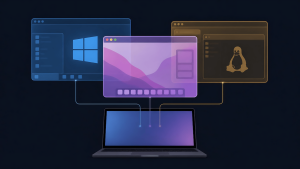
A QA tester managing multiple testing devices including Windows PC, MacBook, Android and iOS phones in a futuristic neon-lit workspace

Testing across Windows, macOS, and mobile devices means paying for annotation tools on every platform doesn’t scale. Discover the free, built-in screenshot and screen recording tools that actual QA testers use for UAT testing and bug reporting, no subscriptions required.