Every QA who has spent time with AI tools hits the same wall. You open ChatGPT or Claude, you know somewhere in there is something useful for what you are testing right now, and then you stare at a blank input box. You type something generic. You get something generic back. You close the tab and write the test case yourself.
The problem is not the AI. The problem is that a blank prompt box is the wrong starting point for someone mid-sprint with a specific feature to test, a specific framework to work in, and a specific output they need. Generic in, generic out. That is not a model limitation. That is a context problem.
Why Prompt Lists Do Not Survive Contact With Real Work
There are plenty of AI prompt lists for QA out there. Most of them are fine as reference material. The issue is that they are written for a hypothetical QA testing a hypothetical feature. When you are testing a checkout flow with Playwright and you need edge case discovery prompts for a payment retry scenario, a list of fifty general QA prompts does not save you much time. You still have to find the right one, adapt it to your framework, rewrite it for your context, and check whether the output is actually useful.
That adaptation work is exactly what you were hoping AI would eliminate. The list just moved the problem one step earlier.
What actually works is a prompt that was built for your situation from the start. Test type, framework, output format, and the specific thing you are testing, all combined into a single ready-to-use prompt you can paste directly into your AI tool of choice. No adaptation. No rewriting. Straight to the output.
What the QA Prompt Builder Does
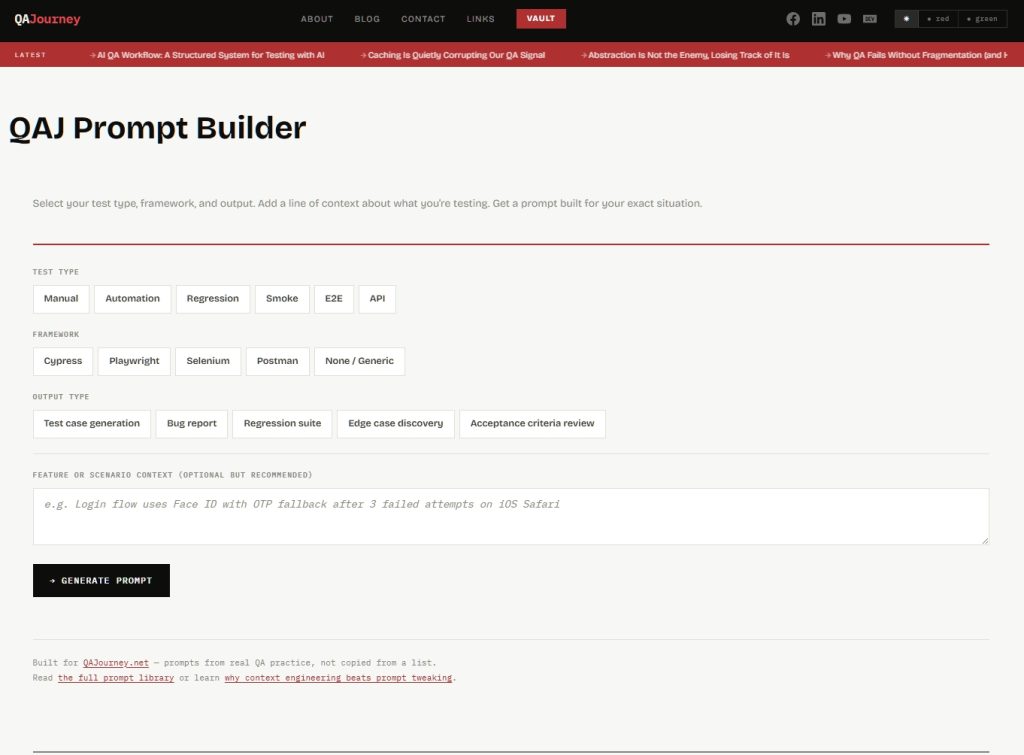
The QA Prompt Builder on QAJourney is a free tool built on exactly that idea. You make three selections and optionally add one line of context, and it assembles a prompt tailored to your exact situation.
Test type covers Manual, Automation, Regression, Smoke, E2E, and API. Framework covers Cypress, Playwright, Selenium, Postman, and a Generic option for situations where no specific tool is involved. Output type covers Test case generation, Bug report, Regression suite, Edge case discovery, and Acceptance criteria review. The context field is where you type one line about what you are actually testing, something like “checkout flow handles payment retry after card decline on mobile Safari.”
The builder combines those inputs using base templates written from real QA practice, not scraped from a list, and produces a prompt that reflects your role, your framework’s conventions, your output format, and your feature context. You copy it and paste it into whatever AI tool you are using.
A Real Example
Say you are running E2E testing with Playwright and you need edge case discovery for a password reset flow. You select E2E, Playwright, Edge case discovery, and type “password reset flow sends OTP to email, expires after 10 minutes” in the context field. The builder outputs a prompt that opens with the right QA mindset for E2E work, includes Playwright-specific locator conventions, and then drives edge case thinking across boundary values, state transitions, unexpected user behavior, and environment differences, all framed around your OTP expiry scenario specifically.
That prompt would have taken you four or five minutes to write yourself if you knew exactly what to include. Most people do not know exactly what to include, which is why AI output for QA work is so often shallow. The builder encodes the structure so you do not have to.
The Conflict Logic: Awkward Combinations Still Work
One deliberate decision in how the builder works is that it does not block combinations that look unusual. Manual testing with Playwright selected, for example, is not a broken combination. A QA who does not write automation can still use a Playwright-framed prompt to understand what needs to be tested manually, or to write test cases a developer will later automate. The builder detects that combination and adjusts the prompt framing automatically, shifting from write-code instructions to manual verification language, and shows you an advisory so you know what it did and why.
Same logic applies to Postman selected with a non-API test type. Manual API testing via Postman is a real workflow. The builder adjusts instead of blocking, because QAs discover tool utility on their own terms and a prompt builder should support that, not restrict it.
Use the Builder
The QA Prompt Builder is live at the QAJ Prompt Builder page. No account needed, no signup, works on mobile. If you are testing something right now and need a prompt that fits, that is the fastest path to one.
If you want to understand the thinking behind how the prompts were structured, read Production-Ready QA Prompts: The Copy-Paste Library which covers the full prompt library the builder draws from. And if you want to understand why context engineering produces better AI output than prompt tweaking, that is covered on EngineeredAI: Context Engineering for LLMs.
What Comes Next
Version one covers the core matrix: six test types, four frameworks, five output types. The plan is to expand output types first, then add framework-specific variants for teams running k6 for performance testing and Burp Suite for security. The embeddable version of the builder will start appearing in relevant QAJourney posts so you can generate a prompt without leaving the article you are reading.
If there is a combination or output type that is missing and you need it, the contact page is there.





0 thoughts on “You Know AI Can Help With QA. You Just Don’t Know What to Type.”