I saw a Scribe ad on YouTube and my first thought wasn’t “that looks useful for onboarding.” It was “that solves the works-on-my-machine argument.” That’s the QA brain at work: you see a tool built for one thing and immediately start mapping it to the problems you actually live with. That’s exactly what this article is about, using Scribe for QA testing even though Scribe was never designed for QA at all.
The “Works on My Machine” Problem
If you’ve spent any meaningful time in QA, you’ve filed a bug that came back with a developer comment that made your eye twitch. The ticket gets marked as cannot reproduce. The dev says it works fine on their end. You know what you saw and you know the steps you took, but your bug report was a numbered list of text steps and a single screenshot, and that apparently wasn’t enough to convince anyone.
If you want to see what a complete bug report actually looks like, how to write effective bug reports covers the structure that holds up under scrutiny.
This isn’t a competence problem on either side. It’s a communication and evidence problem. Text-based reproduction steps require the reader to mentally reconstruct every action you took, in the exact order, on the exact element, in the exact state. One ambiguous step and the whole reproduction chain breaks. The dev goes a slightly different path, doesn’t hit the bug, and now you’re in a back-and-forth that eats up half a sprint.
The real fix isn’t writing better sentences. It’s producing evidence that removes interpretation from the equation entirely.
What Scribe Actually Is
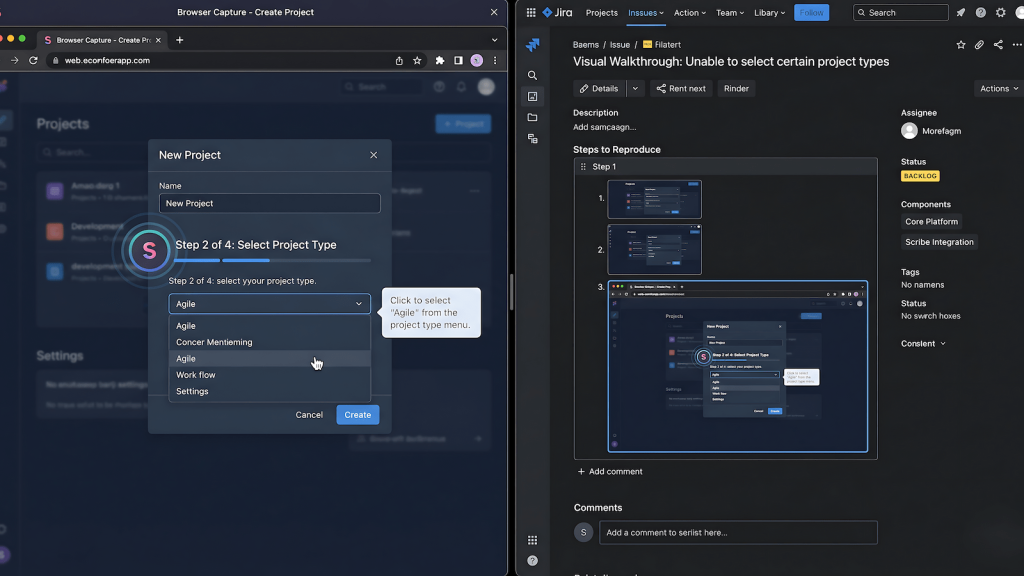
Scribe is a browser extension built for creating step-by-step process documentation. Its target users are operations teams, customer success, HR: anyone who needs to write SOPs or how-to guides without spending hours in a screen recording tool. You turn it on, complete a workflow, and it auto-generates an annotated walkthrough with screenshots at every action. It was not built for software testing. There is no mention of QA on their homepage. The use case they care about is knowledge transfer and process documentation inside non-technical teams.
That framing is exactly why most QAs haven’t looked at it twice. It doesn’t show up in lists of testing tools. It doesn’t integrate with Jira natively as a testing artifact. It doesn’t have assertions or test runners or any of the infrastructure that signals “this belongs in a QA stack.” But none of that matters for the specific problem it actually solves.
Why Scribe for QA Testing Makes Sense: The Codegen Parallel
Here’s the mental model that makes Scribe click for QA work. Playwright has codegen. Cypress has its recorder. Selenium had the IDE before they deprecated it. What all of these do is watch your interactions with a browser and convert them into a structured, reproducible artifact. The artifact in those cases is code, a test script you can run again. The interaction capture is the same loop every time: you act, the tool records, the output is replayable.
Scribe runs the same interaction capture loop. You act, the tool records. The difference is the output format. Instead of a test script, you get a human-readable, visually annotated step-by-step document. Same source material, completely different output target. For automation engineers, codegen produces something a machine can replay. For manual testers, Scribe produces something a human can follow without ambiguity.
This matters because not everything in QA gets automated. Complex UAT flows, one-off regression checks, exploratory sessions: these live permanently in manual territory because the automation ROI isn’t there. Those workflows have always lacked a codegen equivalent. Scribe is as close as it gets without writing a single line of code.
Where Scribe for QA Testing Actually Fits
Exploratory testing sessions
Exploratory testing is where good QAs find the bugs that scripts miss. Exploratory testing is where good QAs find the bugs that scripts miss, the ones that fall outside happy and sad path coverage entirely. It’s also where documentation falls apart completely, because you’re simultaneously designing and executing the test, and stopping to document breaks the flow. The standard workaround is to take notes after the fact, which means relying on memory and inevitably losing detail on the exact path that produced something interesting.
Running Scribe in the background during an exploratory session changes this entirely. You stay in testing mode while the tool captures every interaction. If you find something, you already have a complete record of how you got there. If you find nothing, the session still produces a documented walkthrough of what was covered, which has value for coverage reporting and handoff.
Bug report documentation
This is the most direct application. When you file a bug with a Scribe-generated walkthrough attached, you’re not asking the dev to follow your text steps and hope they interpret them correctly. You’re showing them exactly what you clicked, in what order, on what element, with annotated screenshots at each step. The reproduction path is visual and unambiguous.
The works-on-my-machine response becomes much harder to sustain when the ticket contains a frame-by-frame record of the bug being produced. It doesn’t eliminate environment differences, but it eliminates the interpretation gap that lets those differences get used as a deflection. The dev now has to engage with your actual evidence rather than a text description of it.
UAT walkthroughs and stakeholder sign-offs
UAT is where the PM, PO, and QA come together with business stakeholders to validate that what shipped matches what was specified. The friction point that kills UAT sessions isn’t usually a genuine defect. It’s a stakeholder rejecting something because they don’t understand what they’re looking at, or because the acceptance criteria was written in a way that doesn’t translate cleanly to what’s on screen.
A Scribe walkthrough of the acceptance criteria being executed step by step gives stakeholders a visual reference for what pass looks like before they touch the feature. It also creates a shared artifact that everyone in the room can point to. When a stakeholder questions whether a behavior is correct, you’re no longer having a verbal argument about what the spec said. You have a recorded walkthrough of the spec being met or not met. That’s a different conversation entirely.
What Scribe Doesn’t Do
Being useful in specific contexts doesn’t make a tool universal, and Scribe has real limits worth naming clearly. It has no test assertions. It cannot tell you whether a result is correct. It doesn’t integrate with your test management system as a native artifact type. It won’t replace Cypress or Playwright for anything that belongs in automation. If you’re still working out where that line is, manual vs automated testing covers when each approach actually earns its place.
It also won’t help with API testing, performance testing, or any backend coverage. If you approach it expecting a testing tool, you’ll be disappointed. If you approach it as a documentation layer that fits the interaction capture pattern QAs already use, it earns its place.
How to Fold It Into Your Existing Workflow
The integration is lightweight because Scribe is a browser extension with no setup overhead. For exploratory sessions, turn it on at the start and let it run. Pair it with AI-assisted manual testing if you’re already running that kind of hybrid session.
For bug filing, activate it specifically when you’re about to reproduce a defect you want to document.
For UAT, build a pre-session walkthrough of the key acceptance criteria flows so stakeholders have a reference before the live session begins.
The output is a shareable link or exportable document depending on your plan tier. For bug tickets, paste the link directly into the ticket. For UAT, share it in the pre-session brief. The artifact does the communication work you used to do with paragraphs of text that nobody read carefully.
Final Verdict
Scribe for QA testing is a legitimate workflow addition that most QAs will overlook because it doesn’t come from the testing world. That’s also exactly why it’s worth writing about. The tools that QA practitioners actually find useful in day-to-day work are rarely the ones built specifically for QA. They’re the ones someone looked at sideways and realized fit a problem they’d been solving badly for years.
The works-on-my-machine argument has a documentation problem at its core. Scribe doesn’t fix your test coverage. It fixes your evidence quality. For manual testing, exploratory sessions, and UAT sign-offs, that’s the problem worth solving.