API security testing for QA engineers is not a specialization you pick up from a course. It is a layer of pattern recognition you either get exposed to or you don’t, and most QA teams never get the exposure. Not because they aren’t capable of doing the work. Because nobody put the right things in front of them early enough.
I was not the best tester on my team. I want to be clear about that. When HackerOne vulnerability reports started landing on my desk, it was not because I had a security background or a certification that said I was qualified. It was because I was the most technical person available and someone had to deal with them. My QA lead spent an afternoon showing me Burp Suite. After that, every HackerOne ticket became mine.
That accidental exposure changed how I tested everything. Not because I became a security engineer, but because I started seeing patterns. I learned what broken access control looks like from real bug bounty reports written by researchers who had already found it. I learned what EXIF metadata leakage looks like because I had to reproduce it, extract GPS coordinates from an uploaded image, and confirm the finding before it could be escalated. If you want the full story on that one, the Security QA Without the Security Title post covers it in detail. The short version: I pinpointed a teammate’s exact location from an image they uploaded. That finding stuck with me in a way no textbook entry ever could.
The career side of that story, what it actually means when your job title says one thing and your actual work says another, lives in I Was a Manual Tester Who Handled HackerOne Tickets. This post is the API-specific layer of the same argument.

The Free Afternoon That Confirmed Everything
Fast forward to when I was already QA lead. My team had the sprint covered. There was nothing urgent on my plate. I was browsing an app we were building, not running a formal security pass, just poking around the way QA leads do when they have a free hour and a testing instinct that never fully turns off.
I noticed a token sitting in the URL. Plain as anything. Not hidden, not encrypted, just sitting there in the query string. I copied it. Opened a second browser where I was logged in as a different user. Pasted the token. Got in.
No Burp Suite. No exploit script. No security certification required. Just awareness of what a token in a URL means, which I had because I had spent time triaging reports from researchers who had documented exactly this pattern. My team had not seen those reports. They were testing the same app and none of them had flagged it, not because they were bad testers, but because they had never been shown what to look for.
That is the whole argument. Knowing beats specializing. Curiosity plus application is worth more in QA than a narrow skill set executed perfectly inside a defined scope.
Why QA Teams Miss API Security
Most QA teams test what they are scoped to test. That is not a criticism, that is how resource allocation works in every team I have ever been part of. If the test plan says functional coverage, the team does functional coverage. If security is not in the acceptance criteria, it does not get checked. The problem is that API security failures do not wait for someone to add them to the test plan. They ship anyway.
The other issue is framing. API security gets talked about like it belongs to a different profession. OWASP. Pen testing. Bug bounties. The language signals that this is specialist territory and QA engineers should not touch it without credentials. That framing is wrong and it costs teams real coverage. A QA engineer who understands what broken object level authorization means does not need to write an exploit. They need to know to create two test accounts, grab a resource ID from one, try to access it from the other, and check what comes back. That is a test case. That is QA work.
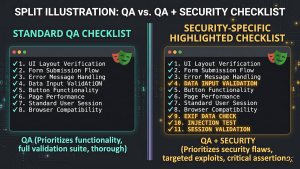
The image that kicked off this post listed ten API security categories. Access control, rate limiting, input validation, sensitive data exposure, business logic abuse, SSRF, external APIs, configuration, API inventory, and frontend gaps. Those are not ten individual mistakes. They are ten buckets, each containing multiple failure modes. Understanding what lives inside each bucket is the skill. Coding the exploit is not.
What API Security Failure Modes Actually Look Like from the QA Side
These are not OWASP definitions. These are the questions a QA engineer should be asking at the API layer during any test pass where security is even loosely in scope.
Access Control
The two-account test is the most important test in this entire list and most QA teams never run it. Create two accounts with the same role. With Account A, create a resource or retrieve a record. Note the ID. Switch to Account B’s session. Hit the same endpoint with that ID. If Account B gets Account A’s data back, the API has broken object level authorization and you just found it with two browser tabs and Postman.
The token in the URL is the lazy version of this failure and it is exactly what I found on a free afternoon with nothing assigned to me. If a session token or auth token is sitting in the query string, visible in the browser address bar, copy it. Open a fresh browser where you are logged in as a different user. Paste it. If it works, that is an access control failure that any attacker with access to browser history, a shared device, or a server log can exploit without any technical skill at all.
Sensitive Data in API Responses
This one is like a developer pushing secrets to the repo. Everyone knows that story. Hardcoded credentials sitting in a public repository, visible to anyone who looks. The API response version of that mistake is more common and less talked about. The UI shows name and email. The raw API response contains role, internal account flags, user profile data, and fields that should never leave the server. And sometimes it is worse than the response body. You open the network tab and the sensitive data is sitting in the response headers, in the plumbing that nobody thinks to check, because developers think about what the body contains and assume the headers are just infrastructure.
This happens because developers build the API to return the full object and trust the frontend to display only what it needs. The frontend does its job. The API already leaked everything before the frontend had a chance to decide what to show. Open DevTools. Read the full response including headers. Any field that should not be visible to that user in that context is a finding worth escalating.
Input Validation at the API Layer
This one shows up most in CMS-type applications. The UI is built with validation baked in, required fields enforced, character limits applied, format checks on every input. The team tests the forms, everything behaves correctly, the test cases pass. Then someone sends a request directly to the endpoint, bypassing the UI entirely. The endpoint accepts it. Malformed values, unexpected field types, parameters that should never be processed, all go through without complaint because the developer built the frontend validation and assumed that was the only layer needed.
In a CMS context that failure is particularly visible because the content renders. It does not just sit in a database. It gets published. A QA engineer who only ever tests through the UI will never find this because the UI is doing exactly what it was built to do. The API is the gap. Send requests directly to the endpoint with Postman. Skip the form entirely. See what the endpoint accepts when there is nothing between it and the payload.
Rate Limiting
Rate limiting is the most commonly misunderstood coverage gap in API testing, and OTP flows are where it hurts most visibly in production. During testing, teams whitelist phone numbers so they can run test cases without burning real SMS sends or hitting delays that slow the test cycle down. That is a sensible testing decision. The problem is that the whitelist is a test environment condition. It does not exist in production.
What exists in production is the carrier. And the carrier has its own rate limits that the application has zero control over. A user who mistypes their OTP enough times in a short window can trigger a five minute lockout on the sending side. A sustained pattern of failed sends can result in a daily limit being hit. Push it further and the carrier flags the number and blocks it permanently. The QA team closed the rate limiting test cases as passed because in their environment the limits they configured worked correctly. Nobody tested what the carrier does to a real number under real conditions because the whitelist removed that condition from the test entirely. That gap lives in production until a real user finds it.
Business Logic
Business logic abuse is the category automated scanners miss most completely, which makes it the most important one for QA engineers to own deliberately. Multi-step flows where you can skip a step and land at the end without completing what came before. Promo codes that can be redeemed multiple times in rapid succession because the validation check and the redemption write are not atomic. Concurrent requests that consume a resource twice because the API did not account for simultaneous calls hitting the same endpoint. These are not exotic attacks. They are logical edge cases that a QA engineer testing with intent rather than closing tickets will find naturally because they require thinking about how the flow could be abused, not just whether it works correctly under normal conditions.
The QA automation framework choice post makes a related point about knowing your testing strength and applying it deliberately. Business logic testing is one of the clearest examples of where human judgment and domain knowledge outperform any tool on the market.
Configuration and Inventory
Debug endpoints left open in production. Verbose error messages that expose stack traces and database structure to anyone who sends a bad request. An old version of the API still responding at /v1/ with weaker authentication than the current /v2/ endpoint that replaced it. These are configuration and inventory failures and they require no technical sophistication to find. Browse the API surface. Send a bad request and read the full error response. Check whether old versions are still live. Document what you find and flag it. The best QA tools for website testing post covers Burp Suite and Postman for this kind of surface-level inspection if you want a starting point on tooling.
Knowing Is the Skill. Not Coding It.
I did not train my team to become security engineers. I trained them to recognize patterns. There is a real difference. A QA engineer who knows what BOLA is can look at an endpoint that accepts a record ID and ask whether it checks ownership. They do not need to write the exploit. They need to know the question exists. If the answer is uncertain, that goes in the bug report and the developer handles it from there.
The EXIF finding, the token in the URL, the HackerOne tickets, none of that required specialized security knowledge to catch. It required exposure and curiosity and the willingness to try something outside the functional test plan. That is a QA instinct, not a security credential.
I was promoted to lead not because I was the best tester in the narrow sense. I was promoted because I had a broader range of pattern recognition than anyone else on the team and I knew how to apply it when something unusual landed on my desk. That range came from exposure. From HackerOne tickets that nobody else wanted to touch. From an afternoon learning Burp Suite. From being curious about a token in a URL when I had nothing else to do.
The QA engineers who protect quality rather than just close tickets are the ones who have seen more patterns. API security testing is one of the most valuable pattern sets a QA engineer can build, and you do not need a security title to start building it. You need exposure and the curiosity to apply what you learn. Your job is quality. Not just the tickets.